项目概述
本大作业利用 ROS 和 Gazebo 仿真环境,实现了一个自主导航建图系统。项目包含以下核心功能:
- 在 Gazebo 中创建自定义仿真环境
- 搭建移动机器人模型并配置传感器
- 使用 gmapping SLAM 算法构建环境地图
- 实现自主导航建图功能
环境准备
- Ubuntu16.04
- ROS kinetic版本
项目实现
1. 创建ros工作空间
1
2
3
4
5
6
| mkdir -p ~/catkin_ws/src
cd ~/catkin_ws/src
catkin_init_workspace
cd ..
catkin_make
source devel/setup.bash
|
在 ~/catkin_ws/src 目录下引用以下ROS功能包:
1
2
3
| mbot_description
mbot_gazebo
mbot_navigation
|
2. 创建自定义Gazebo仿真环境
在 ~/catkin_ws/src/mbot_gazebo/worlds 下创建一个新的 Gazebo 世界文件 myworld.world,内容如下:
1
2
3
4
5
6
7
8
9
10
11
12
13
14
15
16
17
18
19
20
21
22
23
24
25
26
27
28
29
30
31
32
33
34
35
36
37
38
39
40
41
42
43
44
45
46
47
48
49
50
51
52
53
54
55
56
57
58
59
60
61
62
63
64
65
66
67
68
69
70
71
72
73
74
75
76
77
78
79
80
81
82
83
84
85
86
87
88
89
90
91
92
93
94
95
96
97
98
99
100
| <?xml version="1.0"?>
<sdf version="1.6">
<world name="default">
<include>
<uri>model://sun</uri>
</include>
<include>
<uri>model://ground_plane</uri>
</include>
<model name='ground_plane'>
<static>1</static>
<link name='link'>
<collision name='collision'>
<geometry>
<plane>
<normal>0 0 1</normal>
<size>100 100</size>
</plane>
</geometry>
<surface>
<friction>
<ode>
<mu>100</mu>
<mu2>50</mu2>
</ode>
<torsional>
<ode/>
</torsional>
</friction>
<bounce/>
<contact>
<ode/>
</contact>
</surface>
<max_contacts>10</max_contacts>
</collision>
<visual name='visual'>
<cast_shadows>0</cast_shadows>
<geometry>
<plane>
<normal>0 0 1</normal>
<size>100 100</size>
</plane>
</geometry>
<material>
<script>
<uri>file://media/materials/scripts/gazebo.material</uri>
<name>Gazebo/Grey</name>
</script>
</material>
</visual>
<velocity_decay>
<linear>0</linear>
<angular>0</angular>
</velocity_decay>
<self_collide>0</self_collide>
<kinematic>0</kinematic>
<gravity>1</gravity>
</link>
</model>
<model name="cube_red">
<pose>-10 -3 0 0 0 0</pose>
<static>true</static>
<link name="basic">
<collision name="collision">
<geometry>
<mesh>
<uri>/home/jojo/catkin_ws/src/mbot_gazebo/worlds/3.dae</uri>
<scale>1 1 1</scale>
</mesh>
</geometry>
<surface>
<bounce/>
<friction>
<ode>
<mu>0.8</mu>
<mu2>0.8</mu2>
</ode>
</friction>
</surface>
</collision>
<visual name="visual">
<geometry>
<mesh>
<uri>/home/jojo/catkin_ws/src/mbot_gazebo/worlds/3.dae</uri>
<scale>1 1 1</scale>
</mesh>
</geometry>
<material>
<script>
<uri>file://media/materials/scripts/gazebo.material</uri>
<name>Gazebo/CeilingTiled</name>
</script>
<ambient>1 1 1 1</ambient>
</material>
</visual>
</link>
</model>
</world>
</sdf>
|
在 ~/catkin_ws/src/mbot_gazebo/launch 目录下添加launch文件 mygazebo.launch,内容如下:
1
2
3
4
5
6
7
8
9
10
11
12
13
14
15
16
17
18
19
20
21
22
23
24
25
26
27
28
29
30
31
32
33
34
35
36
| <launch>
<arg name="world_name" value="$(find mbot_gazebo)/worlds/myworld.world"/>
<arg name="paused" default="false"/>
<arg name="use_sim_time" default="true"/>
<arg name="gui" default="true"/>
<arg name="headless" default="false"/>
<arg name="debug" default="false"/>
<include file="$(find gazebo_ros)/launch/empty_world.launch">
<arg name="world_name" value="$(arg world_name)" />
<arg name="debug" value="$(arg debug)" />
<arg name="gui" value="$(arg gui)" />
<arg name="paused" value="$(arg paused)"/>
<arg name="use_sim_time" value="$(arg use_sim_time)"/>
<arg name="headless" value="$(arg headless)"/>
</include>
<param name="robot_description" command="$(find xacro)/xacro --inorder '$(find mbot_description)/urdf/xacro/gazebo/mbot_with_laser_gazebo.xacro'" />
<node name="joint_state_publisher" pkg="joint_state_publisher" type="joint_state_publisher" ></node>
<node name="robot_state_publisher" pkg="robot_state_publisher" type="robot_state_publisher" output="screen" >
<param name="publish_frequency" type="double" value="50.0" />
</node>
<node name="urdf_spawner" pkg="gazebo_ros" type="spawn_model" respawn="false" output="screen"
args="-urdf -model mbot -param robot_description"/>
</launch>
|
3. 启动Gazebo仿真环境
在终端中运行以下命令启动 Gazebo 仿真环境:
1
| roslaunch mbot_gazebo mygazebo.launch
|
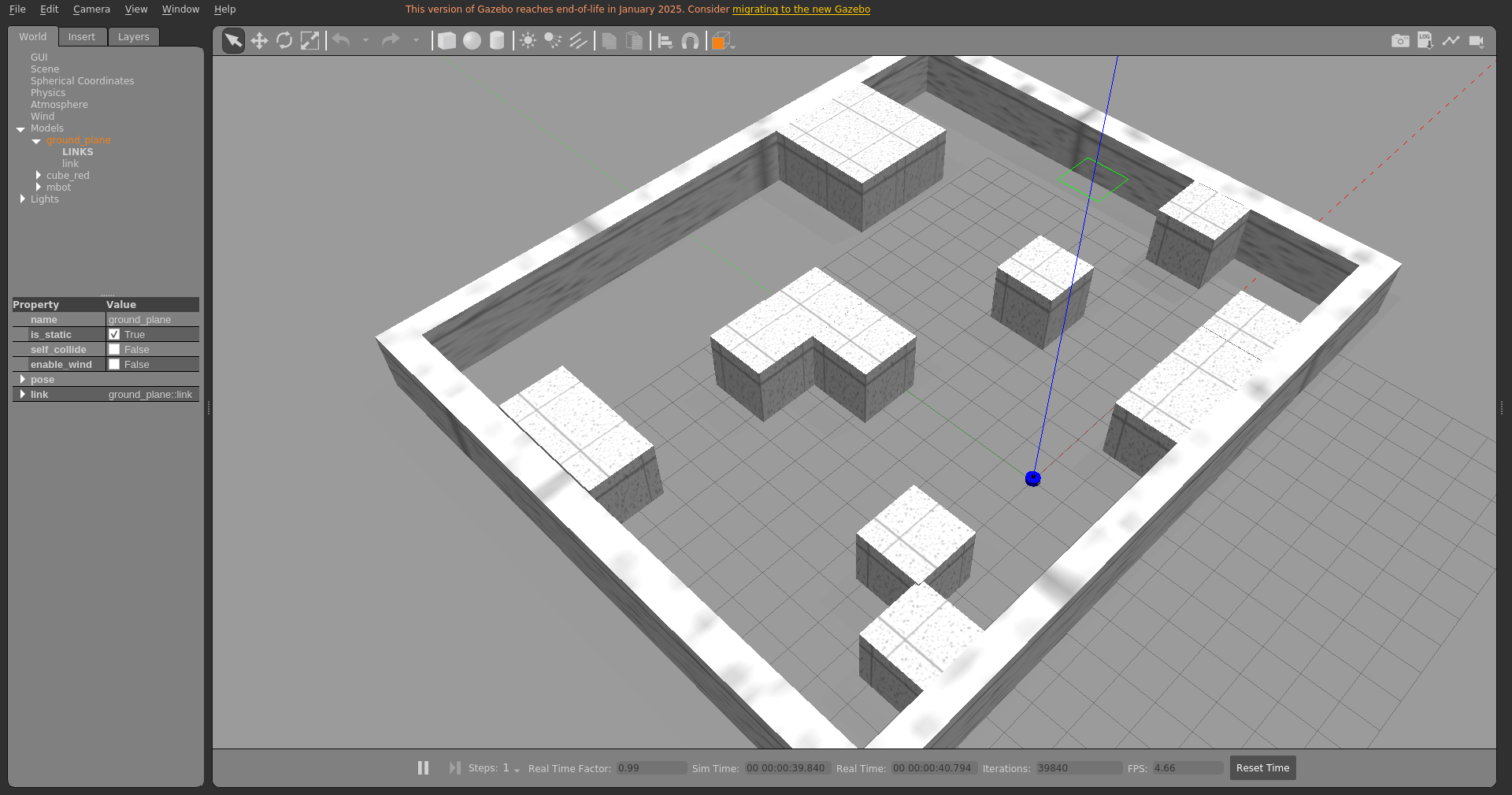
效果如下图所示:
4. 启动RViz可视化工具
在另一个终端中运行以下命令启动导航以及 rviz 可视化工具:
1
| roslaunch mbot_navigation exploring_slam_demo.launch
|
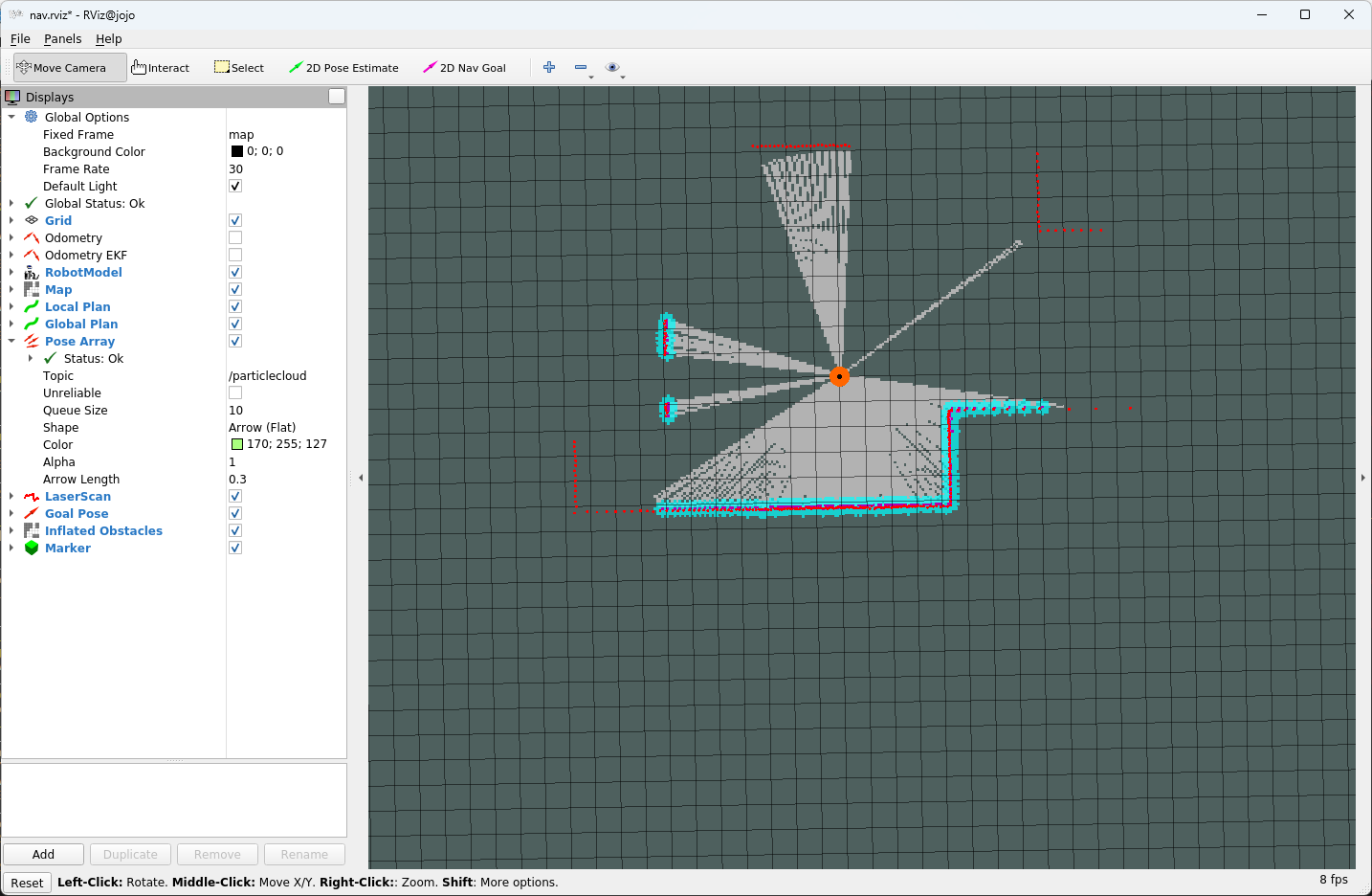
效果如下图所示:
5.启动自动导航建图功能
在另一个终端中运行以下命令启动自动导航建图功能:
1
| rosrun mbot_navigation exploring_slam.py
|
效果如下图所示:
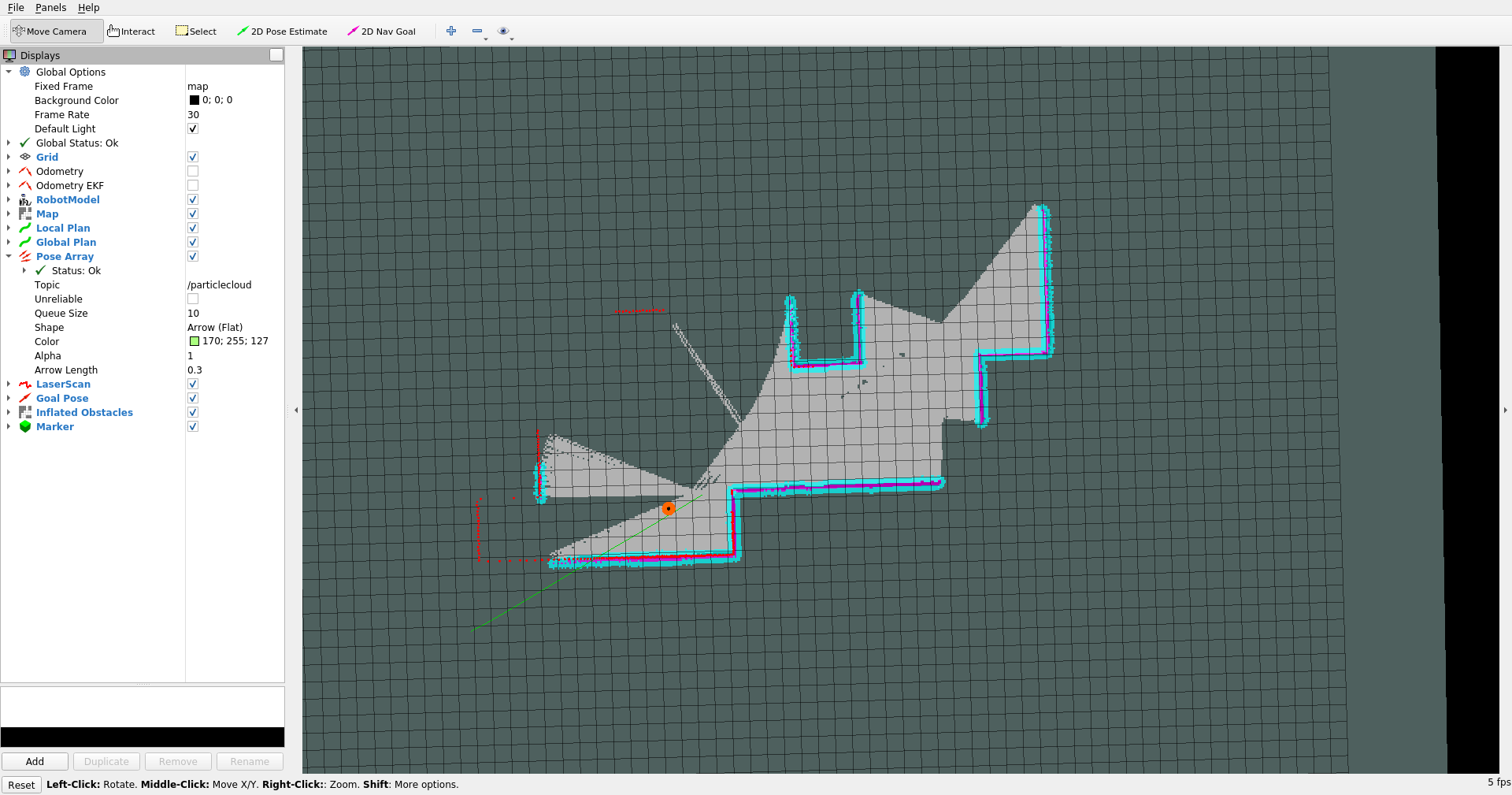
运行结果
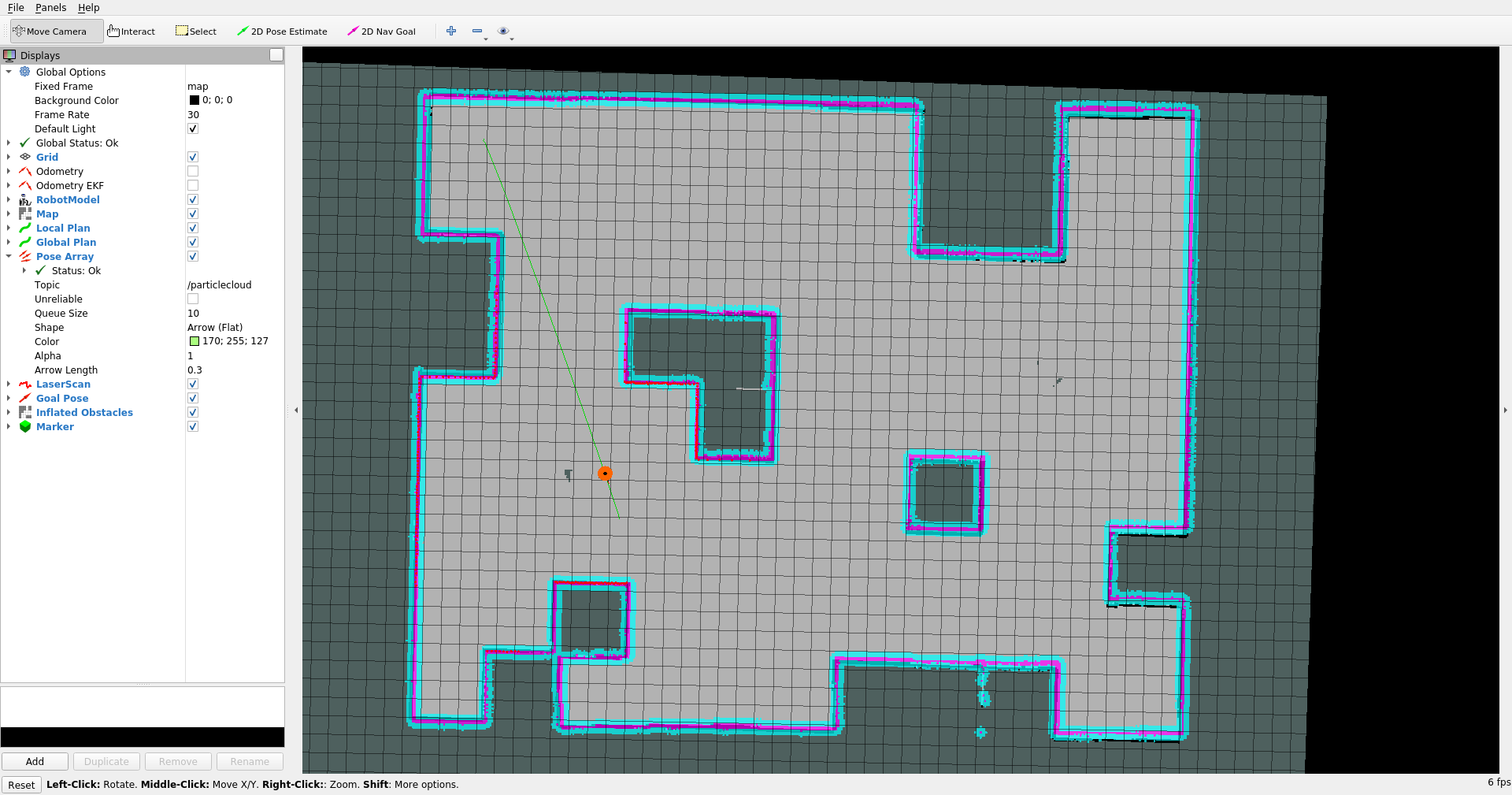
在 Gazebo 中运行自动导航建图功能后,机器人会在仿真环境中自主探索并构建地图。最终生成的地图可以在 RViz 中查看,效果如下图所示: